whit.

How to save money with your new smart meter

This is a simple story about how @haydarkie (the little guy) was able to notch up an incredible victory. He claimed his data back from the electricity companies. We’ll show you the steps he took to get his energy data and save big dollars on his energy bill.

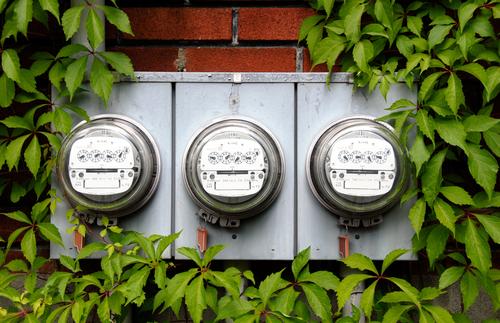
An old fashioned smart meter
These old style meters only report your electricity once in three months. Smart meters record monitor your electricity every half hour.

####Do you have a smart meter? Families commonly ask “How do I know if we have a smart meter?” The answer is that you are notified well in advance by your retailer that the installation will take place, and information will be left for you in your mailbox following the installation. Our story begins with the installation of a smart meter at the little guy’s family house.

Read on →

Silencing PSSE output

Silence!
Thor2011

PSSE prints a voluminous amount of information to the command line when you are running a program. Do you remember seeing this when you start PSSE up?

PSS«E Version 32
Copyright (c) 1976-2012
Siemens Energy, Inc.,
Power Technologies International (PTI)
This program is a confidential unpublished work created and first
licensed in 1976. It is a trade secret which is the property of PTI

We will show you a little function that you can use to selectively turn off this output (and other PSSE output) or redirect it to a log file.

Read on →

How the max buses setting affects your code

..when you have eliminated the impossible, whatever remains, however improbable, must be the truth
Sherlock HolmesThe Sign of the Four

This is a story about psspy.psseinit and how its buses argument is not so innocent and will one day commit a terrible crime on your study.

Have you ever sat and wondered why PSSE insists on asking for a buses argument when initialising? Did you notice that it isn’t optional? I’ve sat at my computer many times thinking: “Will I need 300, 1000 or 10,000 buses?”

Read on →

Find Your PSSE Path, Young Grasshopper

PSSE doesn’t make it easy to import and start using its Python API, psspy. We covered how and why it is beneficial to use Python to drive PSSE , but the implementation had a few limitations. To be specific, the necessary code to get it all working is a bit of black magic for the uninitiated and the PSSE install location is hard coded into the script. We discuss here a new method to get it to work on any setup with a single line of code. Best of all, it is free and and open source.

Read on →

Creating and using bus subsystems


PSSE has two methods for retrieving information.
  1. A single element at a time; and
  2. A group of elements at once.
We believe that for most situations, gathering information about a group of elements at once is the right thing to do. However, collecting that information in PSSE is laborious, so we wrote a subsystem_info function and a blog post to make collecting information from a subsystem simpler.

Now we will take you though how to create a subsystem: a numbered collection of buses, zones or areas from which you can collect information using the subsystem_info function.

Subsystems are a group of buses and can be assigned an id from 0 to 11. Eleven is the highest available subsystem id because PSSE only allows you to have a maximum of 12 subsystems.

Subsystems from areas

Here is the hypothetical situation: Your PSSE saved case has already been set up with 3 areas (0, 1 and 2). We will create a new subsystem with id 0 that contains all the buses in those three areas.

psspy.bsys(sid=0, numarea=3, areas=[0, 1, 2])

You must remember to tell PSSE how many areas are in the list using the numarea = 3 keyword. The requirement to state the number of elements in the areas list is puzzling, because it can cause mistakes in your code if you forget to
change the numarea when you add extra areas.

# an error waiting to happen..
psspy.bsys(sid=0, numarea=3, areas=[0, 1, 2, 3])

Here is another example where we automatically calculate the number of areas:

areas = [0, 1, 2]
psspy.bsys(sid=0, numarea=len(areas), areas=areas)

Subsystems from a list of buses

Now we have a list of bus numbers and want to create another subsystem with id 1:

buses = [201, 202, 304, 305, 400]
psspy.bsys(sid=1, numbus=len(buses), busnum=buses)

Rather than being hard coded like this example, the buses variable could be read from a CSV file or a settings file.

Using the subsystem_info function


Finally, we will create a new subsystem and grab some information about buses in that subsystem using the subsystem_info function.

# first create the subsystem.
buses = [201, 202, 300, 304, 600]
psspy.bsys(sid=1, numbus=len(buses), busnum=buses)

# then collect bus number, name and voltage from the subsystem.
strings = ["NUMBER", "NAME", "KV"]
names_and_voltages = subsystem_info('bus', strings=strings, sid=1)

Ideas for further development

We have shown how to create a subsystem using the PSSE subsystem definition API, but the development shouldn't stop there. In a future post we will propose an alternative subsystem API that will use named subsystems instead of numbered subsystem ids.

Reading and Writing CSV files

Python provides an extensive suite of tools for interacting with CSV files. This article will discuss how to read and write CSV files when Python is calling the PSSE shots. For those unfamiliar with CSV files, each line is a record of information with the data within a record separated by a comma character.

CSV files can be used to store bus numbers along with their name and voltage to be read when ever necessary. Our example will focus on reading and writing a list of bus numbers and their corresponding name and voltage.

Read on →

Do you want files with that? Pop up dialog to ask for PSSE saved file

Pop up box ask for filename

Today we’ll write an example Python function to ask for filenames. You can use this function in your Python code to ask for saved case names or for output CSV file names.

Asking your users for the name of a saved case file using a pop up box is a nice touch. Though it isn’t the only way to to get filenames. Sometimes people hard code filenames into the Python script itself:

Read on →

Restructuring PSSE scripts: a simple tutorial

I came across this PSSE python script recently and thought it would serve as a good example to show how simply restructuring the code will make it more readable.

Writing readable code is important, especially if you plan to share your script with someone in another department or organisation. The person you share with can understand and use your code quickly, they may even further improve your code by adding new features. Conversely a difficult to read script is a chore to work with. Potential bugs are difficult to spot and you may miss the meaning of the code.

Read on →

Turn back time using Python and PSSE

Roads? Where we're going, we don't need roads.
DocBack to the Future II
I have a recurring problem, I spend time carefully adding a new load or generation to my case only to have it blow up when I try to solve. It turns out I wasn’t so careful and didn’t check that the voltage levels were similar or my new bus’ voltage angle was set to the default 0 degrees and the connecting bus was 15 degrees.

There are a lot of reasons why adding new equipment to an existing PSSE case or creating a new switching configuration might fail. If we are lucky, our script stops and we can fix the problem, though I have seen some scripts that keep marching on getting nonsense answers right until the end.

Read on →

Designing an easier PSSE subsystem data retrieval API

I want to take you through a small function that we have written that will combine the entire PSSE subsystem data retrieval API into a single, easier to use function.

What does the original subsystem data retrieval api look like?

Have you ever looked at the PSSE subsystem data retrieval API (Chapter 8 in the PSSE API guide)? With it you can get information about branches and buses (and other elements like machines) for an entire subsystem. So how would we go about getting a list of all of the bus numbers in subsystem 2?

Read on →

Subscribe by RSS.